Search the Web With Arabic Text: What Stays in Your Browser
Send your Arabic straight to a search engine, an encyclopedia, or an AI assistant you choose — and understand exactly what leaves your browser when you do.
Once you have written something in Arabic, a common next step is to look it up — check a word, find a restaurant, watch something, or ask an assistant what a phrase means. Search web takes what is in the box and hands it to a destination you choose.
The mechanics are simple. The part worth reading is what that does and does not mean for your text.
Choosing where it goes
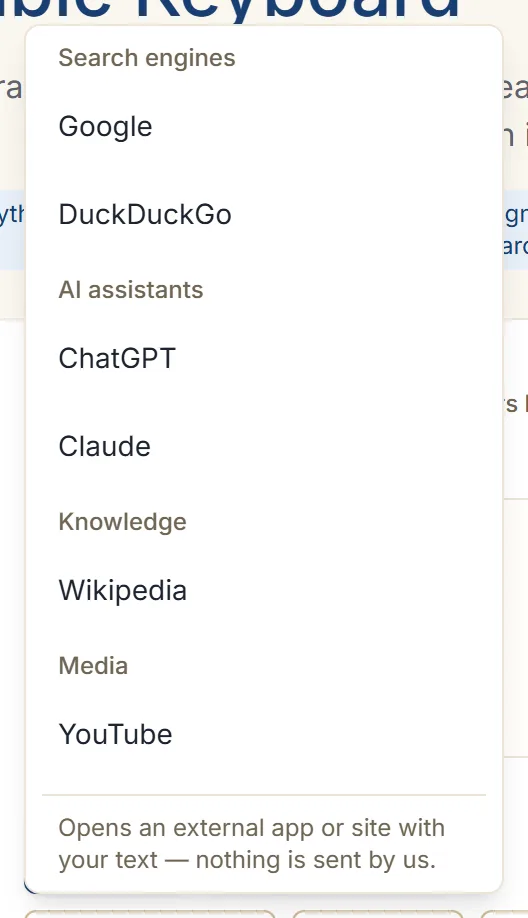
Click Search web and you get a list of destinations, grouped by what they are for:
| Group | Destinations |
|---|---|
| Search engines | Google, DuckDuckGo |
| AI assistants | ChatGPT, Claude |
| Knowledge | Wikipedia, in Arabic |
| Media | YouTube |
Pick one and it opens in a new tab with your Arabic already in its search box.
Nothing is chosen for you and there is no default engine working quietly in the background. If you never press the button, nothing is searched.
What actually leaves your browser
This is the honest version, and it is worth stating precisely.
Your text stays in your browser unless you choose an action such as search, share, copy into another app, or download or export. Searching is one of those actions — it is the moment your text goes somewhere, and it goes to the destination you picked, not to us.
Specifically:
- The text is placed in a link to the destination site, and your browser opens that link. That is the same thing that happens when you type a query into that site yourself.
- From that point the destination’s own rules apply. Google handles the query as Google does; ChatGPT as ChatGPT does. Nothing here changes that, and nothing here can promise anything on their behalf.
- The interface says as much where you choose: it opens an external app or site with your text, and nothing is sent by us.
What is genuinely true — and narrower than “private” — is that the Arabic was produced on your device, not on a server, and that no search happens until you ask for one.
Very long text is shortened
If what is in the box is longer than a search destination can accept, the query is trimmed to fit and you are told so. Your full text stays in the editor untouched — only the search query is shortened.
For anything long, search a distinctive phrase from it rather than the whole thing. That is better searching anyway.
Using it well
A few things it is genuinely good for:
- Checking a word exists. Search the Arabic you just typed. If a search engine returns pages using it the same way, your spelling is probably right — and if it returns nothing, look again at the capitals and apostrophes.
- Looking something up in Arabic. Searching in Arabic surfaces Arabic-language results, which is a different and often better set than translating your query into English first.
- Asking what a phrase means. The AI destinations receive the Arabic directly, so you can ask about a phrase without transcribing it.
- Finding a pronunciation. Media results give you a native speaker saying it, which browser text-to-speech does not promise — listening to your text explains that distinction.
If you would rather not search from here
Copy the text and paste it into whichever site you prefer. That involves one more step and achieves the same thing, with the destination chosen entirely in your own browser.
Copying does not send your text anywhere — it puts it on your device’s clipboard. Copying and sharing covers the routes out of the editor.
Next step
Type a word into the Arabic keyboard and search it in Arabic Wikipedia — it is the quickest way to see the difference between searching in Arabic and searching about Arabic. For the full picture of what is stored while you work, see keeping your Arabic writing private.