Choose the Right Arabic Typing Style
Traditional, English, French, or Arabizi — what each typing style changes, how the same input differs between them, and how to pick one and stay with it.
There is no standard way to write Arabic in Latin letters. Some people write khubz, some write 5ubz, and both mean خبز. So the keyboard offers four typing styles, and picking the one that matches how you already spell is the difference between typing fluently and fighting the tool.
The styles differ in one specific way: how they handle the Arabic letters English has no single letter for — خ, ث, ذ, ش, غ, and the heavy consonants. Everything else is broadly the same.
What each style is for
| Style | Written for someone who spells | Marker |
|---|---|---|
| Traditional | With an apostrophe after the base letter | s' → ش, H' → خ |
| English | With English digraphs | sh → ش, kh → خ |
| French | With French habits | ch → ش, ou → و |
| Arabizi | In chat spelling, with digits | 5 → خ, 9 → ق |
Traditional is the default, and it is the one the rest of this site’s examples assume unless they say otherwise.
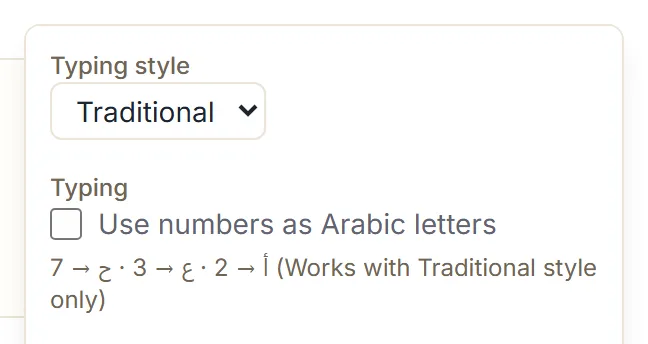
The same letters, four different results
This is the part worth seeing rather than reading about. Each row is one input typed into the editor with nothing else changed:
| You type | Traditional | English | French | Arabizi |
|---|---|---|---|---|
slam | سلام | سلام | سلام | سلام |
khbz | كهبز | خبز | خبز | كهبز |
thlath | تهلاته | ثلاث | ثلاث | ثلاث |
ghali | عهالي | غالي | غالي | gهالي |
chai | چهاي | cهاي | شاي | cهاي |
nour | نouر | نouر | نور | نouر |
3ali | 3الي | عالي | عالي | عالي |
7abib | 7ابيب | حابيب | حابيب | حابيب |
Two things stand out. Ordinary consonant words like slam behave identically everywhere — the
styles only diverge on the letters they were built to disagree about. And where a style does not
recognise a sequence, it writes the letters separately rather than guessing: kh in Traditional
is genuinely k then h, which is كه.
Traditional: the apostrophe style
The base letter, then ' for the version with dots.
| Type | Get | Type | Get | |
|---|---|---|---|---|
s' | ش | t' | ث | |
H' | خ | d' | ذ | |
g' | غ | h' | ة |
It takes a few minutes to learn and it is unambiguous afterwards — every dotted letter follows the
same rule, and nothing is a digraph, so no word can be read two ways. H'bz gives خبز, d'hb
gives ذهب, g'rb gives غرب.
English: the digraph style
Write the digraph the way you would in an English message.
| Type | Get | Type | Get | |
|---|---|---|---|---|
sh | ش | th | ث | |
kh | خ | dh | ذ | |
gh | غ |
So shkra gives شكرا, khbz gives خبز, dhhb gives ذهب. This style also understands the chat
digits without any setting being turned on: 3id mbark produces عيد مبارك straight away.
One caution: the digraphs are the only thing this style changes. It is not a “type it how it
sounds” mode, and the vowel rule still applies — alhamd lillah gives الهامد ليللاه, because
every a and i is still a real letter. You still spell the consonant skeleton.
French: ch and ou
Built for people whose Latin spelling of Arabic comes through French. ch gives ش, so chai
produces شاي, and ou gives و, so nour produces نور — the only style where that vowel pair
works. The kh, th, gh and dh digraphs work here too.
Arabizi: the chat style
The spelling used in messages across the Arabic-speaking world, where digits stand in for letters that Latin has no shape for:
| Type | Get | Type | Get | |
|---|---|---|---|---|
2 | أ | 6 | ط | |
3 | ع | 7 | ح | |
5 | خ | 9 | ق |
5bz gives خبز, 9lb gives قلب, 6yb gives طيب. Not every digit is a letter — 8 has no
mapping and stays as it is.
Picking one
Ask which of these you would write without thinking, if you were texting a friend in Latin letters:
- shukran → English
- chokran → French
- shokran with a
5or a7elsewhere in the message → Arabizi - None of them, and you would rather learn one consistent rule → Traditional
Then stay with it. Switching styles mid-document does not retranslate what you already typed — the Arabic already in the box stays exactly as it is, and only what you type next follows the new style. That is usually what you want, but it means a half-finished word can end up split between two conventions.
Your choice is remembered on the device you set it on, so you only do this once per browser.
If none of them fits
You are not limited to the four. Under Make it yours you can tell the keyboard that a specific
key should write a specific Arabic letter — that typing 7 should give ح, for instance — and your
rules sit on top of whichever style you have chosen. The
custom mappings tutorial walks through
it.
Next step
Open the Arabic keyboard, find Typing settings, and type the same short word in two different styles. Whichever one needed less thinking is your answer.