Make Ramadan and Eid Cards Online
Send a Ramadan or Eid greeting as a card — which phrases to use, which designs suit them, and how to make one card you can send to everybody.
Ramadan and Eid are when most people send Arabic greetings, and when sending the same plain text message to thirty people feels thinner than the occasion deserves. A card takes about a minute and can go to all of them.
Make one
- Open the Arabic keyboard and expand Insert Greetings & Phrases.
- Search for Ramadan or Eid and insert the greeting you want.
- Click Create card.
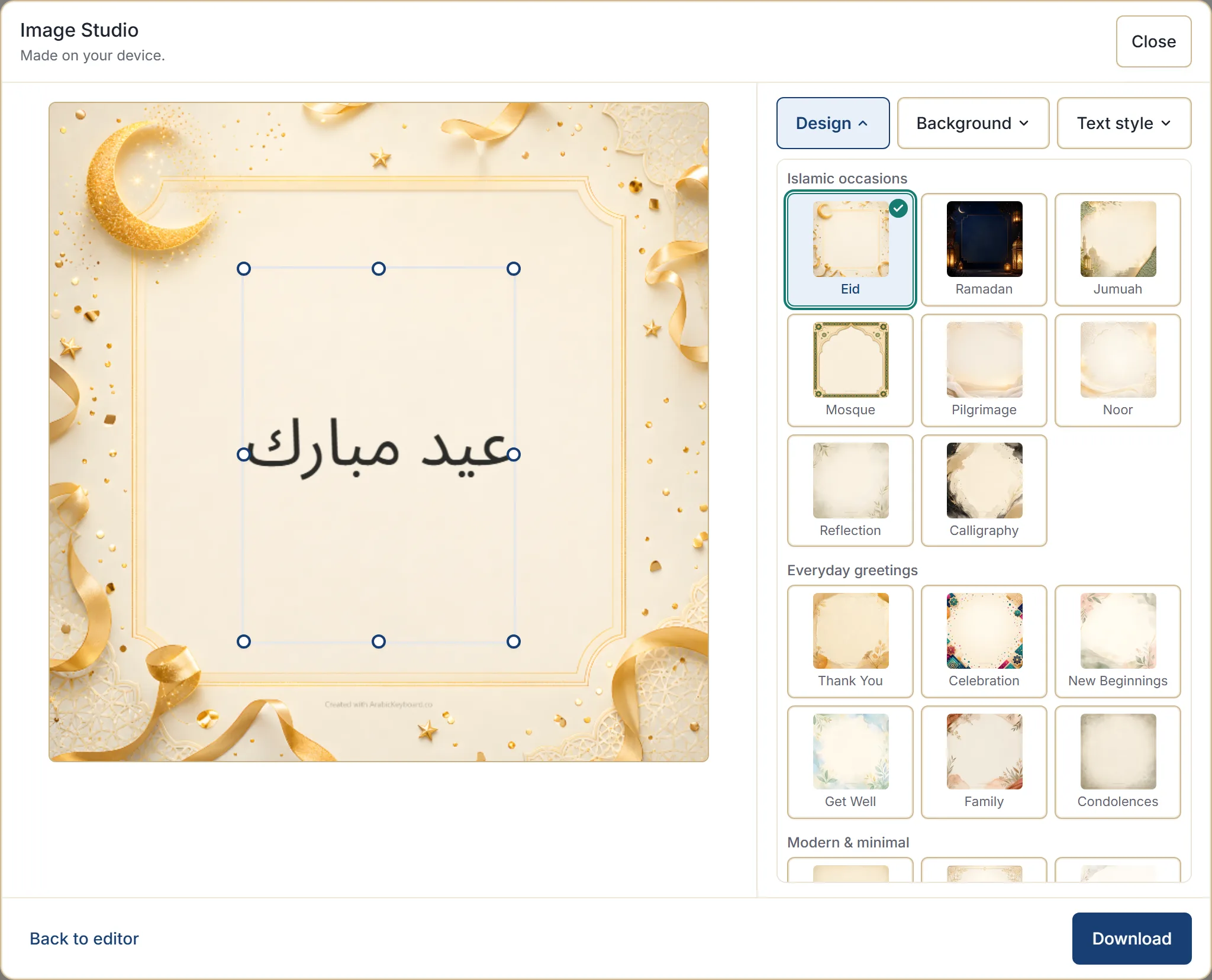
- Open Design and choose Ramadan or Eid from the Islamic occasions group.
- Cycle the Background until one looks right.
- Download.
The greetings people send
All of these are in the phrase library, so you can insert them rather than type them — which is worth doing, because the library spelling is the reviewed one.
For Ramadan
| Arabic | Say it as |
|---|---|
| رمضان مبارك | ramadan mubarak |
| رمضان كريم | ramadan kareem |
| مبارك عليكم شهر رمضان | mubarak alaykum shahr ramadan |
| كل عام وأنتم بخير | kullu ‘aam wa antum bi-khayr |
For Eid
| Arabic | Say it as |
|---|---|
| عيد مبارك | eid mubarak |
| عيد سعيد | eid sa’id |
| عيدكم مبارك | eidukum mubarak |
| عيد أضحى مبارك | eid adha mubarak |
| تقبل الله منا ومنكم | taqabbal Allah minna wa minkum |
عيد أضحى مبارك is specifically for Eid al-Adha. عيد مبارك covers either Eid, which makes it the safe choice when you are sending one card to everyone.
كل عام وأنتم بخير is used for both Ramadan and Eid, and for other recurring occasions, so it pairs with almost anything.
Two lines instead of one
A card with a greeting and a wish reads better than a greeting alone. Use + Message rather than Insert, stack two phrases, and insert the finished line — building a message from ready phrases covers the joins.
Combinations that work:
- عيد مبارك → كل عام وأنتم بخير
- عيد مبارك → تقبل الله منا ومنكم
- رمضان مبارك → كل عام وأنتم بخير
Suggested next offers exactly these pairings once you have added the first phrase, so you can follow it rather than guess.
Typing it instead
If you would rather type the greeting yourself, in the default Traditional typing style:
| Type | Get |
|---|---|
rmDan mbark | رمضان مبارك |
rmDan krim | رمضان كريم |
gid mbark | عيد مبارك |
gid sgid | عيد سعيد |
kl gam w-antm bH'ir | كل عام وأنتم بخير |
With the chat-number setting on, 3id mbark gives عيد مبارك as well —
Arabic chat numbers explains that setting.
Choosing the design
The Ramadan and Eid designs are built for these occasions and are the obvious starting point. Two alternatives worth knowing:
- Noor and Calligraphy are quieter, and suit a message to someone you address more formally.
- Mosque works for either occasion when you want something less festive.
Each design has several backgrounds, so try those before switching design — choosing a card design has the full picture.
Adding a name
Cards to individuals land better with a name on them. Insert the greeting, then type the name after it in the editor before opening the studio.
Keep it short: a greeting and a name fills a card nicely, and anything longer starts to look like a letter.
Sending it
Download saves the image as a PNG, ready to attach anywhere — a message, a group chat, an email, a social post. Where your browser can share files directly, a Share button appears and hands it to your device’s share sheet.
The same card can go to everyone. Making one card and sending it thirty times is the point.
The filename carries the site name and the date only — never your message, the design, or the occasion.
Next step
Open the phrase library and look at the Ramadan & Eid category — it has more greetings than most people know, including several duas used during Ramadan. Insert one, and create your card from there.