Type Tricky Arabic Letters: Hamza, Ta Marbuta, Lam-Alif
How to type the Arabic letters that have no obvious Latin key — the hamza family, ta marbuta, alif maqsura, and the lam-alif ligature — and what to do when one will not come out.
Most Arabic letters have an obvious Latin key. A handful do not — the ones carrying a hamza, the ta marbuta that ends feminine words, and the لا that behaves like a single letter. They are the letters people get stuck on, so this page lists exactly what to type for each.
Everything here uses the Traditional typing style, which is the default.
The hamza family
Six characters, each with its own key sequence:
| Letter | Type | Where it turns up |
|---|---|---|
| أ | -a | Start of many words — أسف, أجر |
| إ | a-- | Words beginning with a kasra sound |
| آ | aa | The long alif — آخر |
| ؤ | w-- | Hamza seated on a waw |
| ئ | y-- | Hamza seated on a yaa |
| ء | -- | The bare hamza, sitting on its own |
So -asf gives أسف, and -asrh' gives أسرة.
The one that catches people
a-- (إ) is a longer entry than -- (ء), and the longer entry always wins. That means an a
sitting immediately before a bare hamza gets swallowed into إ.
Type sma-- hoping for سماء and you get سمإ instead: the keyboard read s, m, then a--.
It is doing exactly what the table says, but it is not what you wanted.
Where the hamza follows a consonant rather than an a, the bare -- works normally — s--al
gives سءال.
When the sequence cannot express the spelling
Some words genuinely cannot be typed this way, and it is better to say so than to pretend
otherwise. شاء needs ش, then ا, then a bare hamza — but typing s'a-- hands the a-- to إ and
produces شإ.
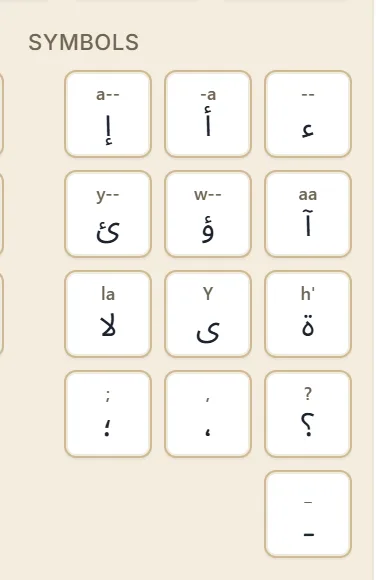
The answer is the on-screen keyboard. Open it, find the Symbols group, and tap ء
directly. Tapping a key inserts that exact character and commits whatever you had typed so far, so
you can type s'a, tap ء, and carry on. The
virtual keyboard tutorial covers the groups in
more detail.
Ta marbuta — the h' ending
ة ends a very large share of Arabic words, and it is one key: h'.
| You want | Type |
|---|---|
| مدينة | mdinh' |
| مدرسة | mdrsh' |
| رسالة | rsalh' |
| بطاقة | bTaqh' |
| صورة | Swrh' |
Leaving the apostrophe off gives you a plain ه, which is a different letter and a different word.
t'lat'h' gives ثلاثة; drop the last apostrophe and t'lat gives ثلات, which is not the word you
were after.
Alif maqsura — capital Y
ى is a capital Y. It is the ending on على, which you type as glY, and on a long list of words
that end in an -a sound written with a yaa shape.
A small y is ي, the ordinary yaa, so the capital genuinely matters here.
Lam-alif — the ligature that looks like two letters
لا is a single entry in the table, not l plus a. Type la and you get it.
This is the most common source of “why did it write that?”, because la also appears in the
middle of words you did not mean it to. salam gives سالام — s, a, then la, then m — when
you wanted سلام from slam. If a word has an unexpected لا in it, look for an a immediately
before an l.
Quick reference
| Type | Get | Type | Get | |
|---|---|---|---|---|
-a | أ | -- | ء | |
a-- | إ | h' | ة | |
aa | آ | Y | ى | |
w-- | ؤ | la | لا | |
y-- | ئ | oo | و |
Next step
Open the Arabic keyboard and try the three that come up most: mdinh',
glY, and -asf. If a letter still will not appear, look for it in the on-screen keyboard’s
Letters, Marks and Symbols groups — every character shown there can be tapped straight
in, which is how you reach a spelling the Latin sequence cannot express.
If the difficulty is reading these letters rather than typing them — telling ح from خ, or knowing why ة only ever turns up at the end of a word — the Arabic reading course covers all 28 letters and their four shapes.