Add Arabic Diacritics and Harakat
Type fatha, kasra, damma, sukun, shadda and tanwin with the equals key, or tap them from the Marks panel — with worked examples of a fully vowelled word.
Everyday Arabic is written without its short vowels. But teaching material, children’s books, poetry, and anything meant to be read aloud correctly often needs them — the harakat, the small marks above and below the letters.
They are never added automatically, because guessing them would change what your text says. You add them deliberately, and there are two ways to do it.
The marks and their keys
Every diacritic is the equals key followed by one letter. The mark attaches to the letter you typed immediately before it.
| Mark | Name | Type |
|---|---|---|
| َ | fatha | =a |
| ِ | kasra | =i |
| ُ | damma | =u |
| ْ | sukun | =o |
| ّ | shadda | =w |
Doubling the equals gives you the tanwin — the doubled endings:
| Mark | Name | Type |
|---|---|---|
| ً | tanwin fath | ==a |
| ٍ | tanwin kasr | ==i |
| ٌ | tanwin damm | ==u |
Vowelling a word, step by step
Work left to right, and put each mark straight after the letter it belongs to.
- Type the bare consonants first if it helps you see the shape.
ktbgives كتب. - Now type the same word with the marks in place:
k=at=ab=agives كَتَبَ. - Change one vowel and the word changes with it —
k=ut=ib=agives كُتِبَ.
The pattern is always letter, mark, letter, mark. There is no separate mode to switch into and nothing to turn on.
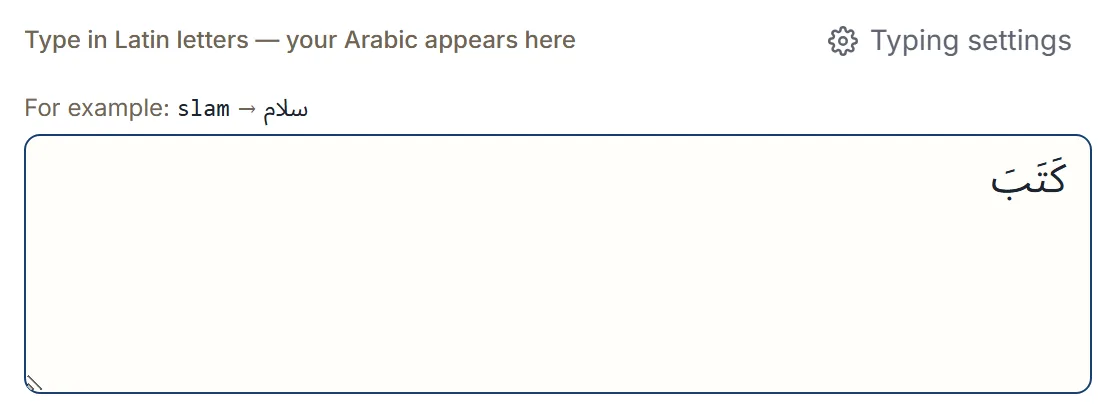
Shadda and sukun in a real word
Shadda doubles a consonant, and it often sits alongside a vowel on the same letter. Type the shadda first, then the vowel:
m=uH=am=w=adgives مُحَمَّد — the shadda on the م, with a fatha after it.b=is=omgives بِسْم — a kasra, then a sukun marking the letter with no vowel.k=ut=obgives كُتْب.
For tanwin at the end of a word, remember the alif that usually carries it is a separate letter:
s'=uk=or==aa gives شُكْرًا — the tanwin, then the alif.
Tapping them instead
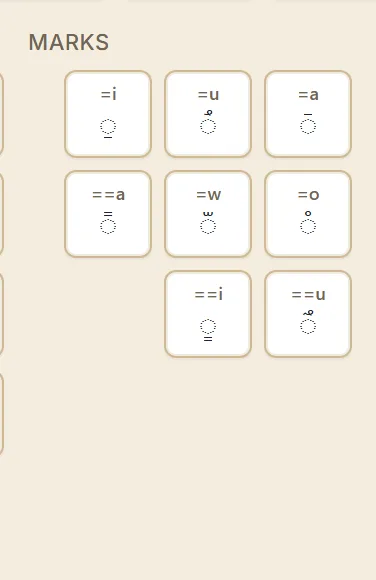
If you would rather not memorise the sequences, the on-screen keyboard has a Marks group with every diacritic as a key. Type your word, then tap the mark you want; it attaches to the letter before the cursor exactly as the typed version does.
This is often the easier route when you are vowelling a long passage, because you can see all the marks at once rather than recalling which letter each one pairs with.
If a mark lands on the wrong letter
Almost always, the mark was typed one letter too early or too late. The diacritic attaches to
whatever character came immediately before it, so k=atab puts the fatha on the ك rather than
where you meant it.
Delete back to the letter you want and retype from there. Marks are ordinary characters in the text, so backspace removes them one at a time.
Should you add them at all?
Mostly, no. Standard Arabic prose leaves harakat out, and a fully vowelled paragraph reads as unusual to an adult native reader — it signals a learning text.
They earn their place when the reader genuinely needs them: language teaching, a word whose reading is ambiguous, a name, or a line meant to be recited accurately. If you are writing a message or a greeting, leave them off.
Next step
Open the Arabic keyboard and type k=at=ab=a. Once that pattern is
familiar, everything else is the same idea with different letters. If you also need the Arabic
numerals, typing Arabic numbers covers the equals key
in its other role.
If what you want is to know what those marks do to a word rather than how to type them, the Arabic reading course works through fatha, kasra, damma, sukun, shadda and tanwin one letter at a time, with vocalized words to read.