Make Condolence and Sabr Cards
Writing a condolence message in Arabic and sending it as a plain card — the wording commonly used, how to type it, and when a card is not the right form.
Condolence messages are short, plain, and hard to write. This page covers the wording people commonly use and how to send it as a card — and it starts with the case for not sending one.
Consider whether a card is right
A card is a designed image. For a bereavement, that is sometimes welcome and sometimes not: a plain text message, a phone call, or being present carries more than an image does, and in many families the expectation is contact rather than a card.
If you are unsure, send plain words. You can write the same Arabic in the keyboard and copy it into a message without making a card at all — everything below about wording applies either way.
Where a card does fit — a shared message to a wider group, a note alongside flowers, a message to someone at a distance — keep it plain.
The wording
These are the phrases commonly said to someone who has been bereaved. They are descriptions of usage, not rulings on what should be said.
| Arabic | Say it as | Sense |
|---|---|---|
| إنا لله وإنا إليه راجعون | inna lillahi wa inna ilayhi raji’un | To God we belong and to Him we return |
| أعظم الله أجركم | a’zam Allah ajrakum | May God make your reward great |
| أحسن الله عزاءكم | ahsan Allah azaakum | May God grant you a good consolation |
| صبر جميل | sabr jamil | Beautiful patience |
| رحمه الله | rahimahu Allah | May God have mercy on him |
| رحمها الله | rahimaha Allah | May God have mercy on her |
إنا لله وإنا إليه راجعون is commonly said on hearing of a death, and in condolences it is often followed by a dua for the person who has died. Its phrase page covers where it comes from and how it is used.
أحسن الله عزاءكم is the one most often written out in full, and it suits a message and a card equally.
صبر — sabr — is the patience these messages centre on, and صبر جميل is a short, widely understood way of wishing it.
The last pair differ only in the ending: رحمه for a man, رحمها for a woman. It is worth getting right.
Practice varies considerably by region, community, and family, and what is customary in one place can be unfamiliar in another. If you know what the family says, say that.
Getting the wording into the editor
There is no dedicated Condolences section in the phrase library yet, but several condolence phrases are already there under Everyday Phrases, ready to insert:
| Phrase | Insert it from |
|---|---|
| إنا لله وإنا إليه راجعون | Everyday Phrases |
| أحسن الله عزاءكم | Everyday Phrases |
| رحمه الله | Everyday Phrases |
| رحمها الله | Everyday Phrases |
Insert those rather than retyping them — the library spelling is the reviewed one, and this is wording you would not want a typing slip in. Anything not in that list you type yourself.
In the default Traditional typing style:
| Type | Get |
|---|---|
-agZm allh -ajrkm | أعظم الله أجركم |
Sbr jmil | صبر جميل |
rHmh allh | رحمه الله |
rHmha allh | رحمها الله |
Sbr | صبر |
The -a at the start of several of these is the alif with hamza, and the capitals are doing real
work — S is ص and H is ح.
If you type أحسن الله عزاءكم instead of inserting it
Inserting it from the phrase library is the easier route, and the one to prefer. If you would
rather type it, it needs one extra step, because it cannot be typed straight through: the hamza in
عزاء follows an alif, and a-- is read as إ rather than as alif-then-hamza — so typing
-aHsn allh gza--km gives أحسن الله عزإكم, which is not the word. The hamza family is set out in
tricky Arabic letters.
Use the on-screen keyboard for the hamza:
- Type
-aHsn allh gza— you get أحسن الله عزا. - Tap ء in the on-screen keyboard’s Symbols group. Tapping a key inserts that exact character, so you now have أحسن الله عزاء.
- Type
kmto finish: أحسن الله عزاءكم.
It is two seconds of extra work, and it is the difference between the phrase and a misspelling of it.
Read the Arabic back before sending it. A capital in the wrong place changes the word, and this is the last message you would want a typing slip in.
Making the card
- Type your message in the Arabic keyboard.
- Click Create card.
- Open Design and choose Condolences, at the end of the everyday greetings group.
- Choose a plain background.
- Download.
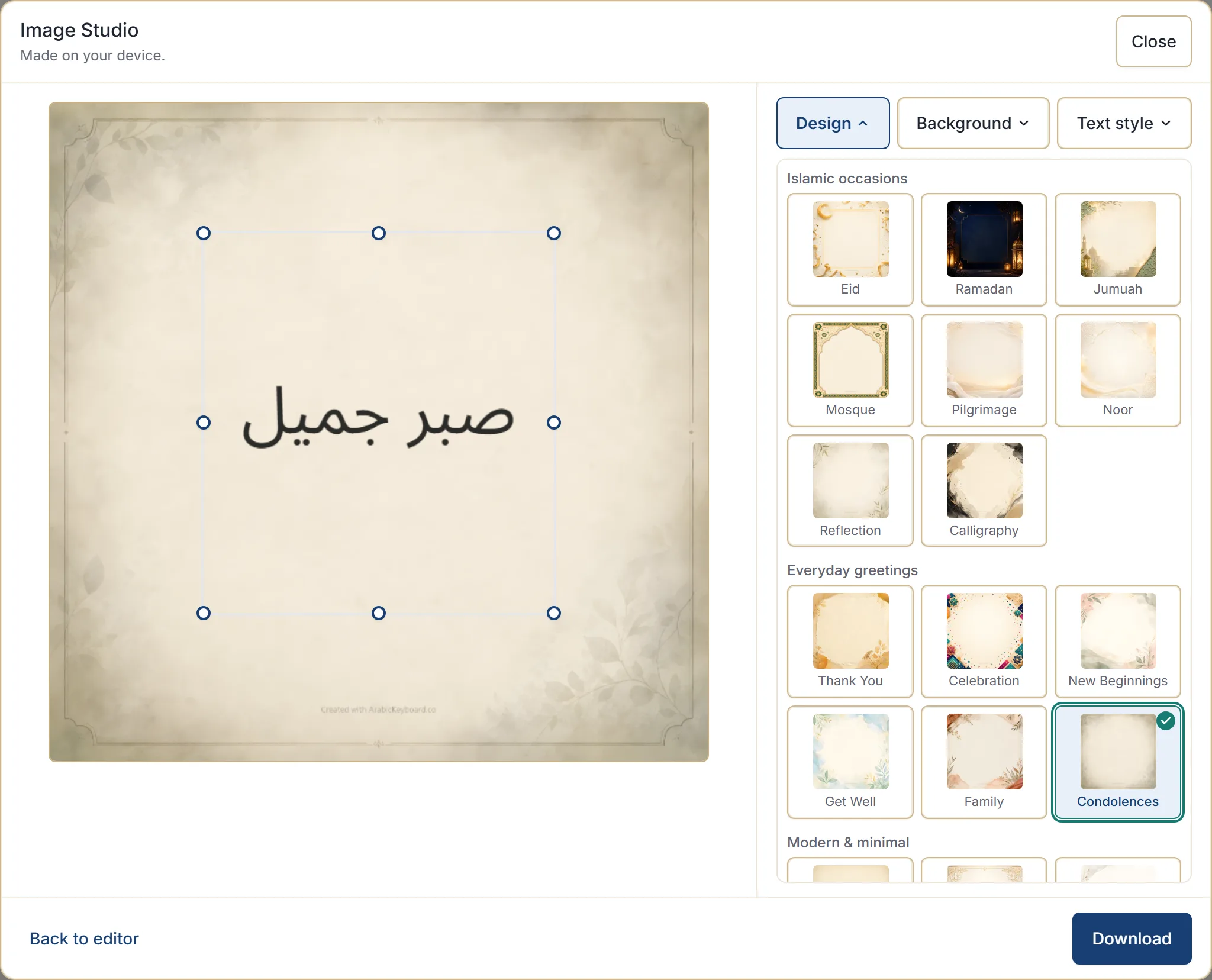
The Condolences design is placed last in its group and is never a default — you have to choose it deliberately. That is intentional, so it is never offered at a moment when it would be jarring.
If the plainer designs suit better, Minimal, Classic and Reflection are quiet alternatives. Avoid anything celebratory or decorative, and prefer the quietest background the design offers.
Keep the text short and the card plain. This is the one occasion where restraint is the whole brief.
What the card maker does not do
Worth saying plainly here more than anywhere.
It does not classify what you write, does not verify it, does not endorse it, and does not detect the occasion or suggest a design based on your words. It renders the text you typed on the design you picked. Every judgement about wording and appropriateness is yours.
Sending it
Download saves the image as a PNG. Where your browser supports sharing files, Share hands it to your device’s share sheet.
The card is made in your browser, and the filename carries only the site name and the date — never your message or the occasion.
Next step
Write the message first, in plain words, and decide about the card afterwards. If you send it as text instead, copying and sharing covers getting it into a message — which for a condolence is often the better form.